
ArmorOps
PERSONNEL & FLEET MANAGEMENT

Personnel Organized
Readiness in view.
Bring personnel, vehicle records, and supporting documents together. See what is missing or expiring, keep renewal history close, and give your team a clearer place to manage operational records.
Personnel Records · Fleet Information · Credential Tracking · OIG Review
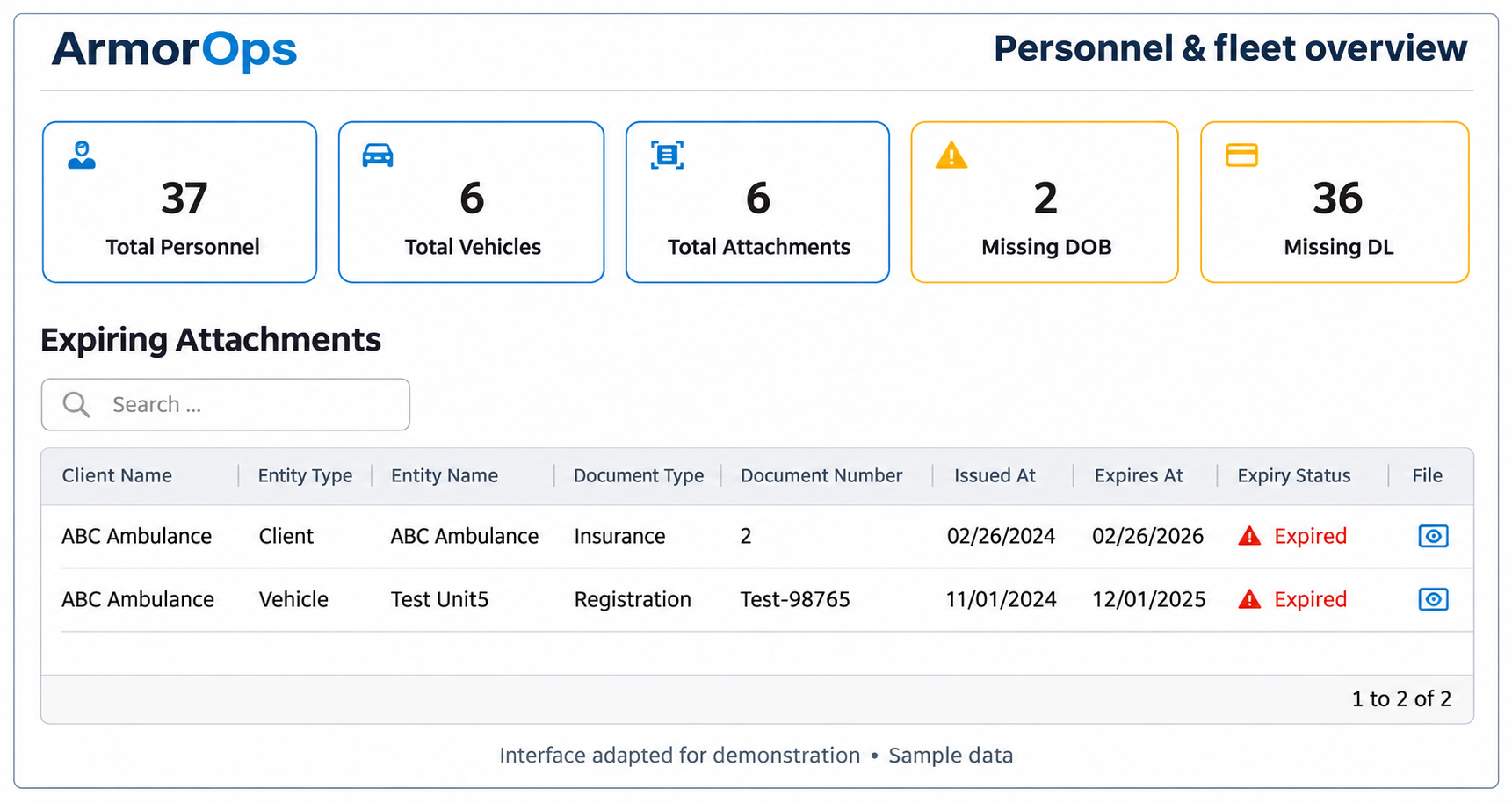
ArmorOps gives EMS administrators a shared place to maintain personnel, fleet, and organizational information. Connect each record with its supporting documents, then follow through on missing information and upcoming renewals.
People, units, and records.
Behind every shift.
BUILT AROUND YOUR OPERATION
01 / PERSONNEL
Maintain individual profiles, credentials, and supporting documents.
Know the people
02 / FLEET
Keep vehicle details and station assignments organized.
Know the units
03 / DOCUMENTS
Review expiration dates, renew documents, and retain prior versions.
Track renewals
04 / OVERSIGHT
Review missing information, OIG matches, and recorded changes.
See the follow-up
EXPIRATION TRACKING & RENEWAL HISTORY
See what needs attention.
Keep the record
behind it.
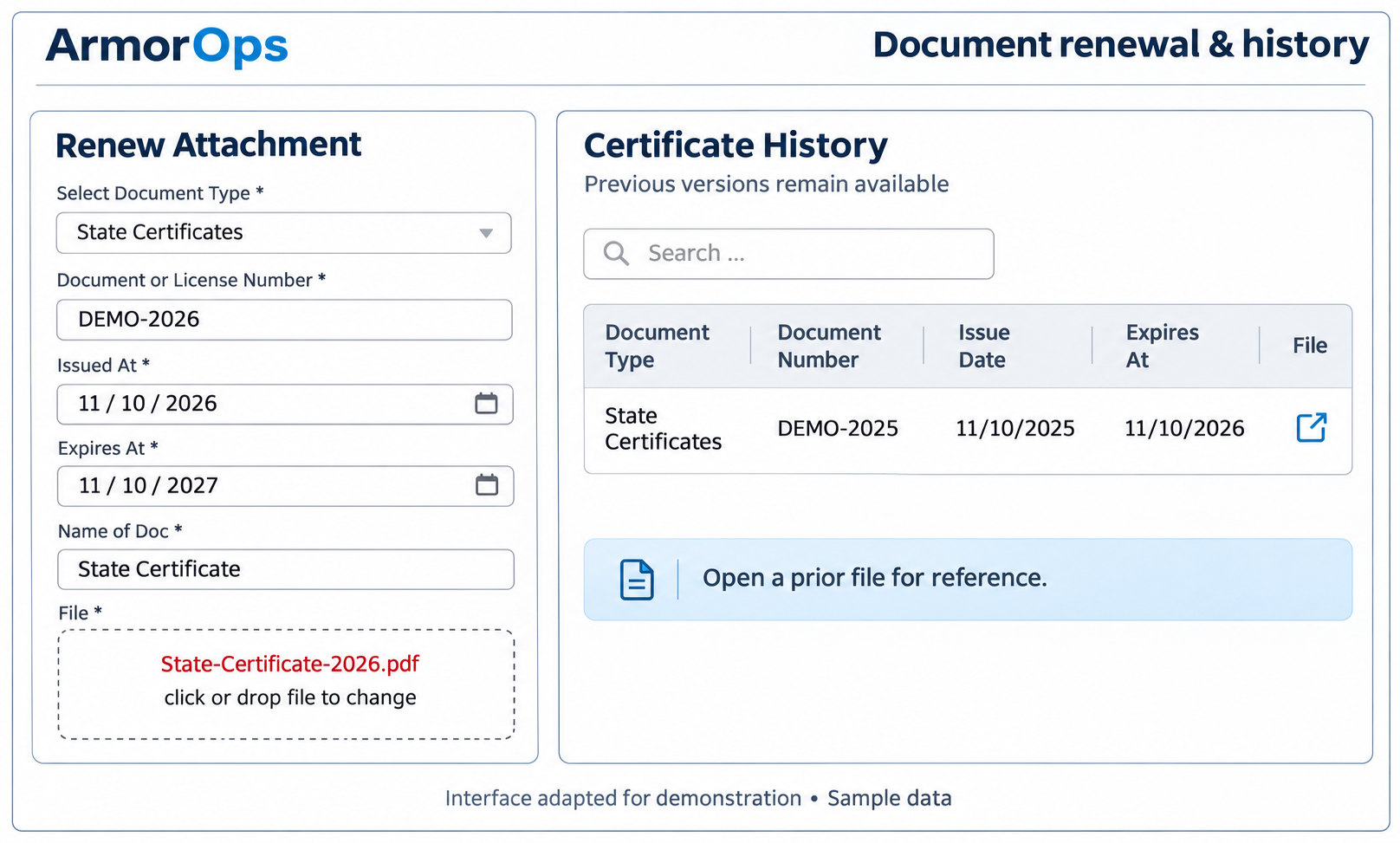
Review expired documents and those approaching expiration from the dashboard. Open an attachment, update the record through renewal, and keep previous versions available for reference.

FROM SETUP TO ONGOING REVIEW
Keep the work connected through every stage.
01 / ORGANIZE
Build the operational record
Maintain personnel profiles, vehicle details, and station assignments. Attach supporting documents to the records they belong to.
02 / REVIEW
Find what needs attention
Review missing information and documents approaching expiration. Examine potential OIG matches to determine which need follow-up.
03 / MAINTAIN
Keep records up to date
Renew documents, retain previous versions, and update operational details. Review change history to see what was changed and by whom.
OIG REVIEW
Compare personnel records against an uploaded OIG exclusion list. Review potential matches and record whether each is accepted or rejected. A potential match requires review before a determination is made.
Review potential matches.
Record the decision.
Upload the OIG list for the selected month and year.
↗
Upload the exclusion list
Run matching against personnel records, then examine the potential matches.
≡
Run and review matches
Accept or reject each potential match based on your review.
◎
Record your determination

CONNECTED ADMINISTRATIVE RECORDS
Keep the details
with the people and units.
Manage the information your organization depends on without separating profiles from their supporting records. Role-based access shapes the screens and actions available to each user.
Keep contact details, certifications, identifiers, emergency contacts, and employment information with each person’s record.
Personnel Profiles
Organize unit details, registration information, station assignments, and required crew roles.
Vehicles and Stations
Store organization-level attachments alongside the client record, with document numbers and issue and expiration dates.
Company Documents
Use Excel templates to add personnel and vehicle records, or enter individual records as needed.
Bulk Imports
Define document categories and supporting fields, including document types that do not expire.
Configurable Document Types
Review recorded additions, edits, and deletions for personnel, vehicles, and attachments.
Change History
EVALUATE IT WITH YOUR WORKFLOW
Use a demonstration to walk through your personnel, fleet, and credential-management process. We’ll review how your document types, renewal work, and access needs fit ArmorOps.
Bring the records
your team manages today.
Identify the personnel, vehicles, and documents you manage.
1
Start with your records
Review expiration tracking, renewal history, and OIG match review.
2
Walk through the follow-up
Discuss import templates, document configuration, and user roles.
3
Review setup and access

BEFORE YOUR DEMO
A few practical questions.
-
ArmorOps brings personnel profiles, vehicle and station records, company documents, credential expiration tracking, and OIG match review into one administrative application for EMS organizations.
-
Yes. Personnel and vehicle records can be added individually or imported in bulk using the supplied Excel templates. We can review your current records and the required fields during a demonstration.
-
The dashboard shows expired documents and those approaching expiration for review. Users with the appropriate access can open the record and renew it. Renewal retains the previous document in an archive so its history remains available.
-
Authorized administrators upload an OIG exclusion list for a selected month and year, run matching, and review the results. Potential matches can be accepted or rejected; accepted matches are flagged on personnel records. A potential match requires review before a decision is made.
-
Yes. Available screens and actions depend on the assigned role and organization. The application supports administrative access across assigned companies as well as personnel access to individual records.
-
Administrators can configure document types for personnel, vehicles, and companies, including additional fields and whether a document expires. Bring examples of your credentials and required documents to the demo.

SEE HOW IT FITS YOUR TEAM
Put your operational workflow
at the center of the demo.
Explore ArmorOps’ personnel records, fleet information, document renewals, and OIG review with your team.
Email info@armorems.com to arrange a demonstration.