
ArmorLogic
COGNITIVE CODING ENGINE FOR AMBULANCE BILLING

Intelligent Coding
Clearer billing oversight.
Bring coding recommendations, data-quality checks, and billing review into one connected workflow. Identify what needs attention, compare coding results with final billed values, and keep transports moving through the billing process.
Automated coding · Data quality · Billing collaboration · Operational Visibility
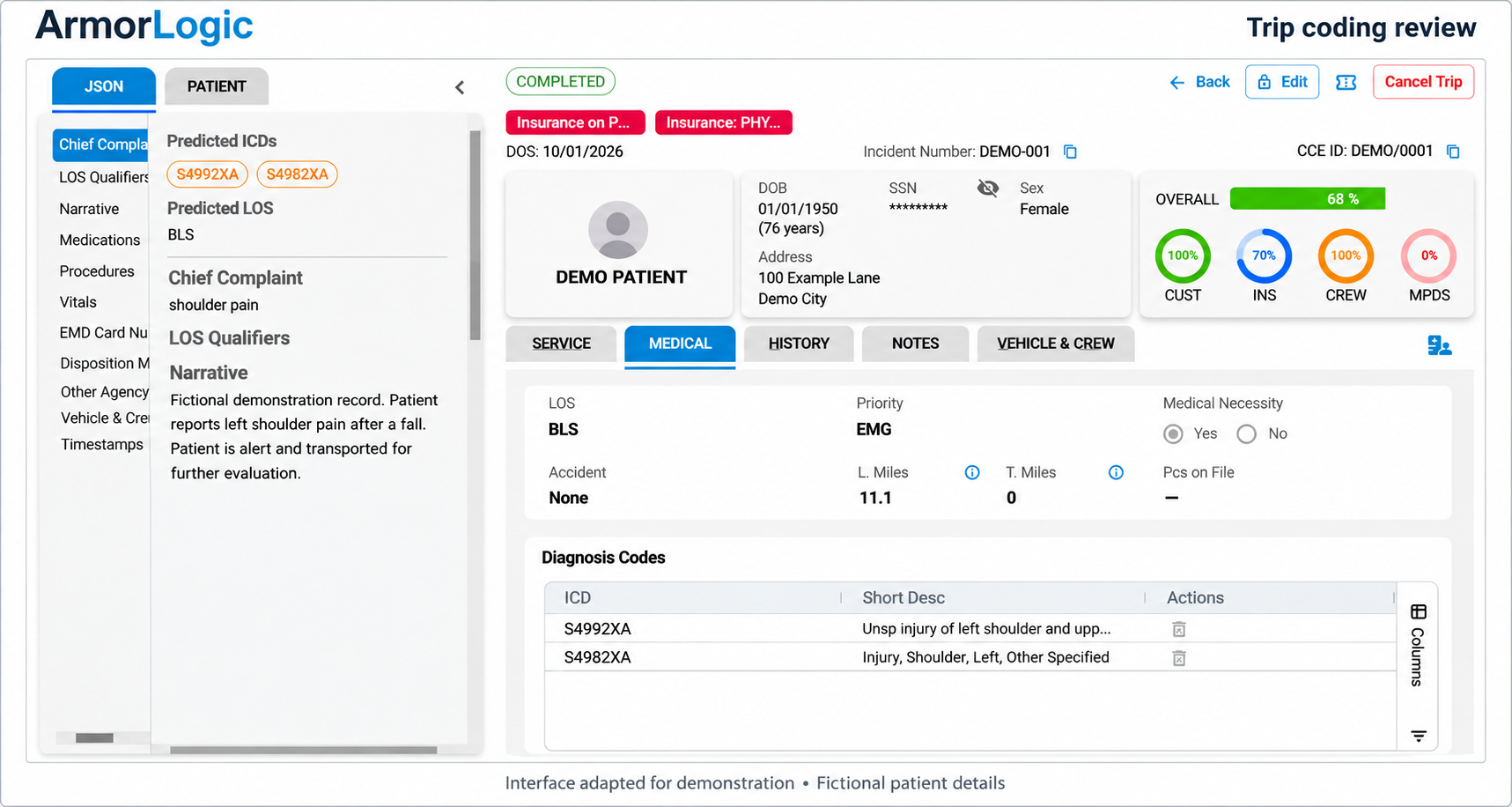
ArmorLogic brings coding recommendations, data-quality checks, and billing collaboration together. Review each transport’s documentation, resolve missing information, and compare coding results with final billed values—all within a connected workflow.
From the source record
to a more informed review.
BUILT AROUND YOUR BILLING WORKFLOW
01 / CODING
Generate level-of-service, priority, ICD-10, and medical necessity results from ePCR data, with cases requiring manual review identified.
Build on the clinical record
02 / DATA QUALITY
Review demographic completeness and validity with CDI reporting, including names, contact details, identifiers, and loaded mileage.
Find data gaps earlier
Resolve documentation and billing questions through tracked exception conversations linked to the specific transport.
Keep questions with the run
03 / COLLABORATION
04 / OVERSIGHT
Compare coding with final billed values, monitor received trip volume, and review runs flagged by configured billing rules.
See what needs attention
VARIANCE & RECONCILIATION
Make coding performance
something you can examine.
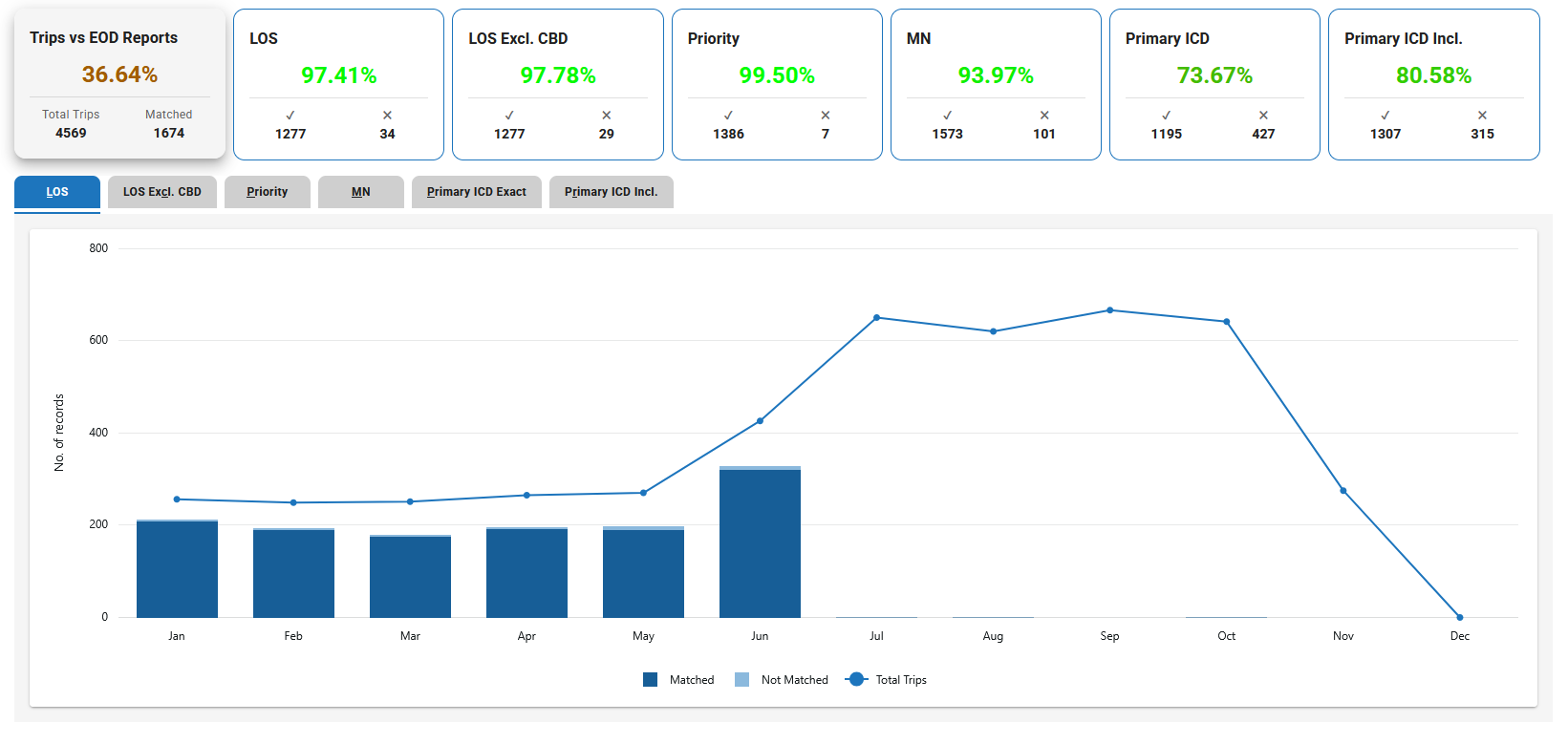
Compare ArmorLogic’s coding results with final billed values from your day-end reports. Review differences in level of service, priority, medical necessity, and diagnosis codes, and identify trips missing from either source. Each difference provides a starting point for review—not an automatic indication of error.

FROM INCOMING TRIPS TO INFORMED ACTION
Keep the work connected through every stage.
01 / PROCESS
Start with the trip data
Import ePCR records, generate coding results, and identify data-quality issues. Apply enabled address and mileage checks where needed.
02 / REVIEW
Resolve what needs attention
Review coding exceptions and rule findings. Keep requests for information, replies, and supporting attachments tied to the transport.
03 / RECONCILE
Follow the results through
Export supported coding outputs for billing, compare against final day-end values, and monitor reconciliation gaps and trip-volume trends.
BILLING COLLABORATION
Missing documentation, insurance questions, and discrepancies need a clear follow-up process. Exceptions keep the request, conversation, attachments, and status with the run, so both teams can see what happens next.
Give every question
a place to be resolved.
Prioritize outstanding requests
↗
Track open and overdue requests by department.
Keep the conversations together
≡
Keep replies, attachments, and billing questions together for each transport.
Receive optional alerts for new exceptions and summaries of data quality and trip volume.
◎
Stay informed between logins

DATA QUALITY & OPERATIONAL VISIBILITY
Spot the gaps behind billing delays.
Look beyond the coding result. ArmorLogic helps teams examine the quality of incoming data, check billed runs against configured requirements, and recognize changes in the flow of trips.
Track demographic validity and completeness, compare monthly client scorecards, and review trips behind flagged results.
CDI Reporting
Check day-end reports against client, state, and payer rules. Review flagged results without changing the source report.
Rule-based report checks
Where enabled, calculate route distance when loaded mileage is blank, zero, or one. Other supplied mileage stays unchanged.
Google mileage check
Compare received trip volume with a rolling three-month baseline. Review activity by receipt date or service date to investigate gaps.
Run Pulse Metrics
Where enabled, look up and store pickup addresses’ ZIP+4 extensions. Review unconfirmed addresses for follow-up.
ZIP+4 address lookup
Opt in to monthly exception and CDI summaries and twice-monthly trip-volume updates through your account team.
Scheduled notifications
EVALUATE IT WITH YOUR OWN DATA
A pilot can process a representative sample of already-billed trips and compare the results with your team’s final values. It runs alongside your current process without changing how those historical claims were billed.
See the results on
runs you already know.
Confirm the sample, required files, and pilot timeline.
1
Agree the scope
Compare coding results with billed values, and review data quality, rule findings, and reconciliation gaps.
2
Process and compare
Examine trips behind the differences and discuss what the findings mean for your operation.
3
Review the findings together

BEFORE YOUR DEMO
A few practical questions.
-
ArmorLogic combines ambulance coding with tools for data quality, billing questions, coding comparisons, trip reconciliation, volume monitoring, and rule-based report checks.
-
ArmorLogic compares its coding results with final values from your day-end reports. It measures agreement and highlights differences for review. A difference may reflect a coding issue, a billing adjustment, or a documentation gap; it does not automatically indicate an error.
-
ArmorLogic processes NEMSIS/XML ePCR data and exports supported coding results to XML. Day-end report checks also support CSV and Excel. We review your systems, file formats, and mapping requirements during the demonstration or pilot kickoff.
-
Billing administrators configure and run report rules for their billing group. ZIP+4 lookup and mileage checks are enabled per account, with ZIP+4 export controlled separately. We’ll review the appropriate settings for your workflow.
-
Opted-in administrators receive notifications when exceptions open and can receive monthly summaries. Replies do not trigger email notifications, so teams check the exception queue for conversation activity. Automatic closure follows the configured age from creation; administrators can place requests On Hold when more time is needed.
-
Yes. We can discuss a pilot using already-billed trips and matching day-end reports. Scope, file requirements, data-sharing arrangements, and timing are agreed before the pilot begins. A data-sharing agreement must be in place before patient data is transferred.

SEE HOW IT FITS YOUR TEAM
Put your billing workflow
at the center of the demo.
Explore ArmorLogic’s coding, data-quality checks, billing collaboration, and reporting with our team.
Email info@armorems.com to arrange a demonstration.